SEO

eCommerce Keyword Research

Build commercially relevant keyword clusters around products, customers, problems, attributes, and buying intent.

Carlton Clark
Written by Carlton Clark

Partner, Carbon Box Media · Co-Founder, Visible

SEO & CRO specialist with 15+ years designing and ranking websites.

Updated October 202624 min readBuilt for eCommerce operators
☷ Jump to section ⌄

What is eCommerce keyword research?

eCommerce keyword research is the process of finding the searches that can grow organic revenue, then turning those searches into a prioritized plan for the pages your store should build or improve. Ranking for more keywords and growing traffic are useful outcomes, but they are not the finish line. The goal is to attract search traffic that can eventually make money.

Start with a five-step process that moves from understanding the business to publishing the right pages.

01

Search Opportunity Discovery

Study the brand, customers, products, USPs, reviews, competitors, ranking gaps, and the different reasons someone might search for what you sell.

02

Build and cluster the keyword list

Turn qualitative findings into a broad keyword set, add current and competitor rankings, then group phrases that share the same search intent.

03

Build the page map

Decide which existing or new page should satisfy each keyword cluster: homepage, collection, product page, blog, comparison page, support page, or another destination.

04

Prioritize

Order the roadmap by relevance, business value, search intent, ranking feasibility, product fit, catalog depth, and strategic objectives instead of search volume alone.

05

Execute

Build or improve the pages, connect them with internal links, publish them, measure rankings and revenue, and use the results to decide what to build next.

The goal

Your final deliverable should not be a giant spreadsheet of keywords. It should be a guided build plan that tells your team what opportunities exist, which page should own each one, what needs to be created or improved, and what should happen first.

Three keyword research mistakes that make SEO look ineffective

Most brands do not fail because there are no keywords available. They fail because the research stays too shallow, the wrong page gets assigned to the keyword, or the final page is not useful enough to deserve rankings.

01Surface-level research

Teams chase the obvious high-volume terms, even when those keywords are extremely competitive or only loosely relevant. The hidden opportunity is often deeper in the long tail: specific products, personas, problems, attributes, use cases, comparisons, and buying concerns that automated exports tend to miss.

02Ignoring search intent

Finding a keyword is only half the battle. A blog cannot reliably replace a collection page when shoppers want to browse products. A homepage should not be forced to target every category. And multiple pages should not compete for the same search intent.

03Low page quality

A page is not useful because it contains the keyword. Weak content is not actionable, accurate, opinionated, relevant, or meaningfully different from what already exists. Research only creates value when the page built from it is worth ranking and worth reading.

Step 1: Start with Search Opportunity Discovery

Before opening a keyword tool, build a qualitative understanding of the business. We call this Search Opportunity Discovery: the research that tells you what the brand can credibly rank for, what customers care about, and where the most commercially useful search opportunities are likely to exist.

What should you research?

  • Products and best sellers: what the business actually sells, what has strong margins, what converts, and what the team wants to grow.
  • Customers: who buys, why they buy, what they compare, what they worry about, and which use cases matter.
  • Reviews and support questions: the language customers use for benefits, problems, objections, features, sizing, compatibility, and outcomes.
  • USPs and mechanisms: materials, ingredients, technology, processes, certifications, design choices, guarantees, and differentiators.
  • Competitors: what they rank for, which categories they have built, which topics they cover well, and where their site leaves gaps.
  • Existing search performance: queries and pages already earning impressions, clicks, rankings, or revenue in Google Search Console.

Use five keyword pillars to make sure you do not think too narrowly

Keyword pillarWhat it helps you uncover
Branded keywordsBrand searches, product names, reviews, comparisons, retailers, support, and navigational demand.
What you sellProducts, categories, subcategories, materials, compatibility, styles, and direct commercial searches.
Who you servePersonas, audiences, industries, locations, activities, experience levels, and customer-specific needs.
Problems you solvePain points, objections, desired outcomes, frustrations, and problem-aware searches that can lead to a product.
Your mechanism or USPFeatures, ingredients, materials, processes, certifications, technology, and differentiators competitors cannot easily copy.

Example: one product category can create dozens of search paths

Start with men's running shorts. “What you sell” can reveal 5-inch shorts, 7-inch shorts, 2-in-1 shorts, and shorts with pockets. “Who you serve” can reveal shorts for marathon runners or tall men. “Problems you solve” can reveal anti-chafing running shorts. “USP and attributes” can reveal lightweight, breathable, reflective, quick-dry, or black running shorts.

The products may be the same. The search journeys are different. That is the raw material for your keyword list and, later, your site architecture.

Image placeholderSearch Opportunity Discovery worksheet showing products, customers, reviews, USPs, competitor gaps, existing rankings, and the five keyword pillars.Provide a screenshot, diagram, or client example for this section.

Step 2: Build and cluster a broad keyword list

Now turn the qualitative research into search data. The objective is breadth first: collect the different ways customers describe the product, category, problem, use case, attribute, audience, comparison, and question. Then cluster related phrases so you can analyze them without creating a separate page for every wording.

Our Step 2 workflow: turn qualitative research into a mapped keyword database

01

Build the qualitative research corpus

Scrape the brand website, export first-party reviews, collect competitor reviews, and pull supplemental material such as product documentation, FAQs, support content, specifications, and other language customers use to describe the product.

Use for this step: Screaming Frog or another site scraper, Shopify or review-platform exports, competitor review sources, and product documentation.
02

Expand qualitative findings into keyword ideas

Search product attributes, customer phrases, USPs, pain points, People Also Ask questions, Reddit threads, comparison language, and use cases in a keyword tool. Then add the site's current rankings from Ahrefs or Semrush and Google Search Console, plus ranking keywords from relevant competitors.

Use for this step: Ahrefs or Semrush, Google Search Console, Google SERPs and People Also Ask, Reddit, and your qualitative research notes.
03

Cluster keywords by search intent

Group phrases that can be satisfied by the same page. Use SERP overlap and the meaning of the query to avoid building multiple URLs that compete for the same intent.

Use for this step: Keyword Insights or another clustering tool, plus manual Google SERP checks for important clusters.
04

Build the working target-page map

Assign each cluster to an existing or future URL. Give each target page one primary keyword, one secondary keyword, and roughly 5-10 tertiary keywords that reinforce the same intent without creating duplicate content.

Use for this step: Google Sheets, your URL crawl, Google Search Console, and your keyword database.

Do not automatically remove 0-volume keywords

Keyword tools estimate demand. They are especially unreliable at the lower end of the volume curve, where specific commercial searches can be underreported or grouped into another phrase. A 0-MSV keyword can still be valuable when the query is highly relevant, has clear purchase intent, and describes exactly what your catalog sells.

This is where low-competition, high-conversion opportunities often hide. Use reported volume as one signal, not a permission slip.

How should you judge an opportunity while building the list?

SignalQuestion to ask
RelevanceDoes this search genuinely describe the product, customer, problem, or buying journey?
Commercial valueIf this page ranks, is there a logical path to a product, collection, lead, or strategically valuable customer?
Ranking feasibilityAre smaller specialist sites ranking, or is the SERP dominated by sites far stronger than yours?
Page-quality gapCan you create a better assortment, explanation, comparison, tool, example, or experience than the current results?
Product advantageDo you have the catalog depth, expertise, mechanism, customer evidence, or differentiation to be a credible answer?

Step 3: Build the page map and match search intent

Once you have the keyword list, decide what kind of page should rank. This is where search intent becomes important: the search result tells you what the customer expects to find after they click.

Finding a keyword without matching intent is like recruiting an army and sending the wrong unit into battle. You can have a great keyword and still lose because the page format is wrong.

What is a category-defining keyword?

A category-defining keyword is the broad commercial phrase that best explains what the business sells as a whole. For a focused store, the homepage may target something like “airsoft guns,” “roses,” or “office furniture.” More specific searches should usually belong to dedicated collection or product pages so the homepage does not compete with the rest of the site.

Search patternUsually best destination
Broad category-defining search + branded demandHomepage
Commercial product categoryCollection page
Attribute, audience, use case, price, style, or problem with shopping intentCollection or commercial landing page
Specific product, model, or SKUProduct detail page
Best / top / recommendedBuying guide or curated commercial page, depending on the SERP
Product A vs. Product BComparison page or article
How to / why / what isEducational article or guide
Brand reviews, legitimacy, story, supportBrand, review, About, or support page

Three intent mistakes to catch before you build anything

  • Creating a blog that should be a collection. If Google is ranking product category pages, the searcher probably wants to browse—not read 2,000 words before seeing products.
  • Optimizing the homepage for too many keywords. The homepage should define the business and distribute authority, while more specific categories get dedicated destinations.
  • Creating several pages for the same intent. Different wording does not always mean a different page. If the SERPs overlap heavily, consolidate the phrases into one owner.

When should a keyword become a collection page?

For many eCommerce brands, the highest-value keyword opportunity is a missing commercial landing page. Use this test before adding another collection:

Relevant demand+commercial intent+distinct assortment+5+ products=collection candidate
  1. Search the keyword. Are collection or category pages consistently ranking?
  2. Check product fit. Does your catalog genuinely satisfy the query?
  3. Check product depth. Is there enough assortment to make browsing useful?
  4. Check distinctness. Is this a different shopping intent from an existing page?
  5. Choose the parent page. Where should this page sit in the hierarchy, and which broader collection should link to it?
  6. Assign one owner. Decide which URL owns the cluster so you do not create cannibalization.

A strong architecture usually moves from broad to specific: Homepage → Pillar Collection → Subcollection → More Specific Subcollection → Product. See our eCommerce site architecture guide for the hierarchy and our collection-page SEO guide for how to build the destination.

Image placeholderPage map showing keyword cluster, search intent, existing or new URL, page type, parent page, product depth, and internal-link path.Provide a screenshot, diagram, or client example for this section.

Step 4: Prioritize what to build first

Once every cluster has a proposed destination, turn the page map into a roadmap. Search volume can help estimate opportunity, but it should not decide the order by itself. A smaller commercial keyword that your store can win may be more valuable than a giant informational term that never converts.

Priority signalWhat to ask
RelevanceHow closely does this keyword match the products, customer, and market the brand wants to own?
Business objectiveDoes the opportunity support revenue, a strategic category, an important product, or a valuable audience?
Search intentHow close is the searcher to browsing, comparing, or buying?
Ranking feasibilityCan the site's current authority and page quality realistically compete with the live SERP?
Product / collection depthCan the catalog actually support the page without stretching relevance or creating a thin collection?
Topical leverageWill this page make other collections, products, and content in the cluster easier to strengthen?
Effort vs. upsideHow much design, writing, development, merchandising, or authority building is required relative to the likely payoff?

A simple order of operations

  1. Fix high-value existing pages first. An important collection already ranking on page two can be a faster win than a brand-new idea.
  2. Build missing bottom-of-funnel pages. Create commercially useful collections and landing pages where the catalog already supports the demand.
  3. Build supporting content around those commercial pages. Add comparisons, buying guides, best-of content, how-tos, and educational pieces that strengthen the cluster.
  4. Move into harder terms as authority grows. Use the rankings, links, engagement, and internal authority from the first wins to attack broader keywords later.
Priority rule

Start with the intersection of relevance, revenue potential, and realistic feasibility. SEO should compound from wins—not begin with the hardest keyword in the spreadsheet.

Step 5: Execute the page map and measure what makes money

Keyword research is only useful when it changes the website. Build or improve the assigned pages, connect them to the rest of the cluster, and measure performance at the page and query level.

  1. Optimize existing pages. Update targeting, metadata, headings, copy, merchandising, product depth, FAQs, and internal links where the right URL already exists.
  2. Create missing commercial destinations. Build the collections, landing pages, comparisons, or support pages identified in the page map.
  3. Produce supporting content. Publish the buying guides, best-of posts, comparisons, how-tos, FAQs, problem-solution articles, and educational resources that help the cluster earn authority.
  4. Connect the ecosystem. Link supporting articles to relevant collections and products, collections to subcollections, and parent pages to the commercial destinations you want search engines to prioritize.
  5. Track more than rankings. Measure clicks, landing-page conversions, revenue, assisted conversions, and the growth of the entire cluster—not only whether one keyword moved up three positions.
  6. Repeat. Use what ranks, converts, and attracts links to decide which branch of the topic should be expanded next.

See our eCommerce internal linking guide for the linking system that connects these assets once they are live.

Can eCommerce blogging actually generate revenue?

Yes—when the topic, page format, product, and conversion path are aligned. Lone Pouches is a useful example because the content strategy did not start with “nicotine blog topics.” It started with customer concerns and product differentiation.

The campaign focused on non-branded searches around cleaner, safer, and healthier product alternatives—queries that aligned with the product's positioning and with people actively comparing options.
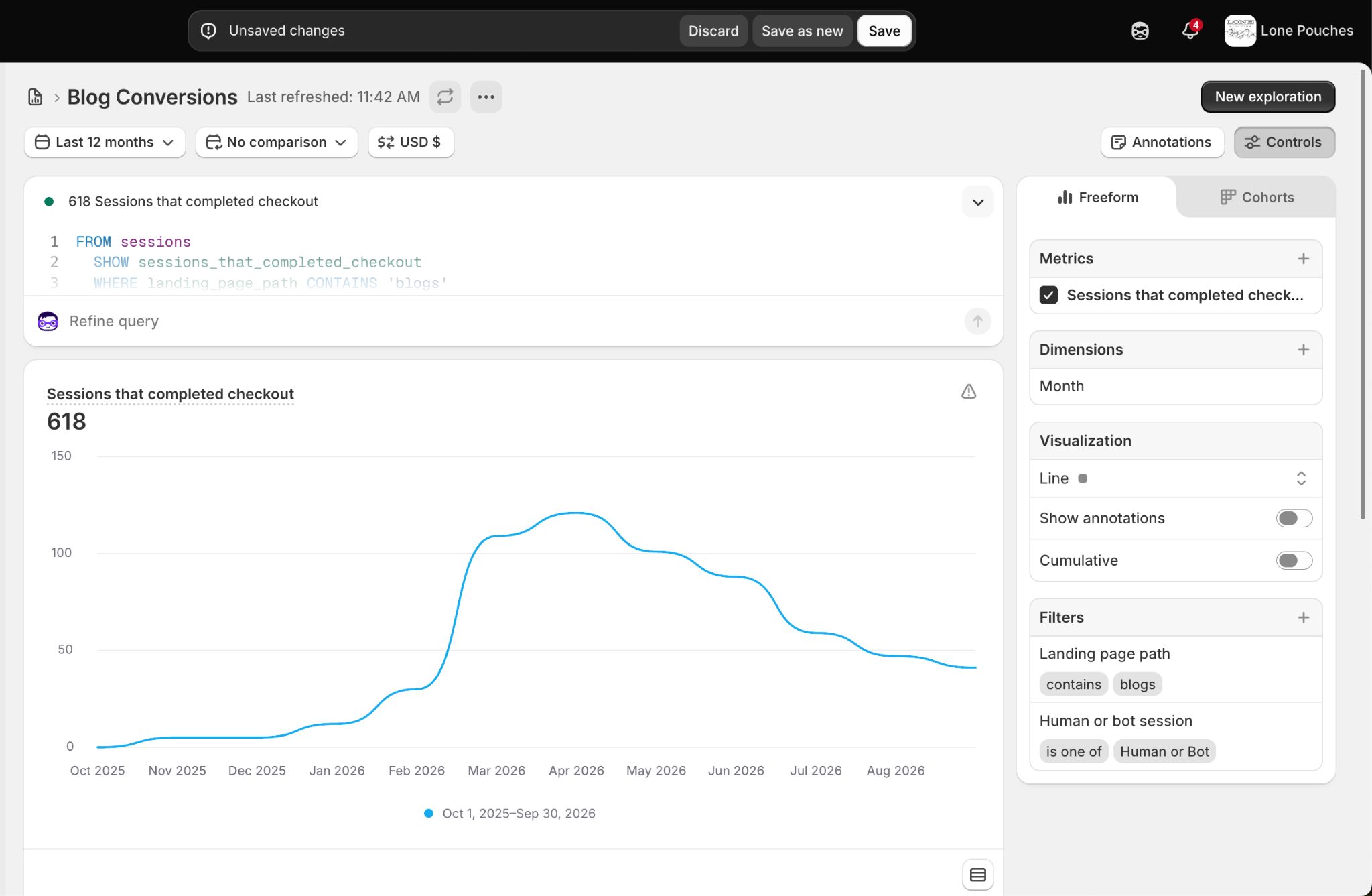
618blog sessions that completed checkout in the last 12 months
$38,965estimated revenue from those conversions at a $63.05 AOV
15.6xrevenue generated for every $1 invested in the $2,500 blog project
1,459%estimated ROI after subtracting the $2,500 content investment
Lone Pouches Shopify report showing 618 blog landing-page sessions that completed checkout over the last 12 months
Lone Pouches Shopify exploration filtered to blog landing pages: 618 sessions completed checkout from October 1, 2025 through September 30, 2026.

At a $63.05 average order value, 618 checkout-completing blog sessions represent approximately $38,964.90 in attributed revenue. Against the $2,500 content investment, that is about 15.6x revenue-to-spend and an estimated 1,459% ROI using the standard formula: (revenue − cost) ÷ cost.

The lesson is the alignment behind the keywords: customer concern + product differentiation + realistic target + correct page format + useful content + conversion path. Traffic became valuable because the content solved a real search problem that naturally led back to the product.

Want us to build the map?

Carbon Box Media turns keyword research into the collections, content, internal links, and implementation roadmap behind the campaign. Book a strategy call and we will review where your store is leaving search demand on the table.

Keyword research tells you what to target. On-page SEO turns the map into rankings.

Once the keyword map is approved, execution moves to the page itself. The target keyword determines which URL owns the intent; on-page optimization makes that URL the clearest, most useful destination for the search.

That usually means aligning the URL, meta title, H1, heading structure, above-the-fold copy, supporting entities, collection or product depth, FAQs, internal links, and conversion path with the page's assigned keyword cluster.

Next guide

Continue with our eCommerce on-page SEO guide to see how we execute a mapped keyword on the page after research is complete.

eCommerce keyword research FAQs

What is eCommerce keyword research?+

eCommerce keyword research identifies searches that can contribute to organic revenue and maps those searches to the right homepage, collection, product, landing, comparison, support, or content page.

Should I ignore keywords with 0 monthly search volume?+

No. Search-volume tools are estimates and can underreport highly specific searches. Validate the query's relevance, intent, SERP, and business value before deciding whether to keep or remove it.

When should a keyword become a collection page?+

Create a collection when the query has commercial browsing intent, the assortment genuinely satisfies the search, there are at least 5 relevant products to make the page useful, and the intent is distinct enough to deserve its own destination.

How many keywords should one page target?+

Give each page one clear primary intent, but group closely related variations that lead to the same SERP and can be satisfied by the same page. Do not create a separate URL for every wording.

How do I know whether a keyword is too competitive?+

Compare the live ranking domains, page types, content quality, page-level links, topical depth, and your own product advantage. Keyword difficulty is useful context, but it is not a universal yes-or-no score.

Should blog posts link to collection pages?+

Yes, when the link helps the reader. Supporting content should move users toward relevant commercial destinations and show search engines how informational topics connect to the products and categories the store wants to rank.

Can AI do keyword research for me?+

AI is useful for expanding semantic variations, personas, problems, mechanisms, use cases, and content angles. It should support—not replace—customer research, search data, product knowledge, SERP validation, and human judgment about business value.

eCommerce keyword research glossary

TermPlain-English definition
KeywordA word or phrase someone types or speaks into a search engine or AI search experience.
Keyword clusterA group of closely related searches that can usually be satisfied by the same page or belong to the same topic.
Search intentWhat the searcher is actually trying to accomplish—learn, browse, compare, navigate, or buy.
Search volume / MSVAn estimate of how many times a keyword is searched in an average month. Useful context, not a perfect count.
Long-tail keywordA more specific search that usually has lower reported volume but can have clearer intent and lower competition.
Keyword difficultyA third-party estimate of how difficult a keyword may be to rank for, often based heavily on backlinks or SERP strength.
SERPThe search engine results page—the live results Google shows for a query.
Category-defining keywordThe broad commercial phrase that best describes what the business sells as a whole and often becomes the homepage's primary non-branded target.
Page mapA plan that assigns keyword clusters to existing or future URLs and specifies the correct page type for each one.
Keyword cannibalizationWhen multiple pages on the same site compete for substantially the same search intent instead of reinforcing one clear destination.
Collection pageAn eCommerce category page that lets shoppers browse multiple products matching a commercial search.
PDPProduct detail page—the page for one specific product, model, or SKU.
Topical authorityThe depth and connectedness of a site's useful pages around a subject, demonstrated through products, collections, content, expertise, and internal links.
Information gainUseful new value a page adds beyond commodity summaries, such as original testing, customer evidence, expert judgment, first-party data, or a unique framework.
Internal linkA link from one page on your website to another page on the same website, helping both users and search engines understand how the site is connected.